How to add a custom connector to Claude (and what the free plan allows)
In short
How to add a custom MCP connector to Claude: the exact menus, what the free plan allows, connection options, removal and precautions to take.
By FezolaPublished Updated 4 min read

On this page
Short answer: on Claude, go to Customize, Connectors, click + Add, then Add custom connector, enter a name and the remote MCP server URL, review the sign-in options and click Add. It works on every plan, including Free, which is limited to one custom connector. Everything below comes from Anthropic's support documentation, checked on 9 November 2026.
What a custom connector is
A custom connector is a remote MCP server you add yourself, for a service that is not in Claude's directory. Claude connects to it from Anthropic's cloud, so you do not install anything on your computer, but the server must be reachable over the public internet. If the idea is new, what is an email MCP server explains it with an example.
Which plans allow it
According to Anthropic's support article:
- Custom connectors using remote MCP are available on Claude, Cowork and Claude Desktop for Free, Pro, Max, Ultra, Team and Enterprise plans.
- Free users can add one custom connector.
- Whether you can add one from the mobile apps is not stated on the page. The connection itself, when it exists, comes from Anthropic's cloud for every Claude client.
Add a connector on Pro, Max or Free
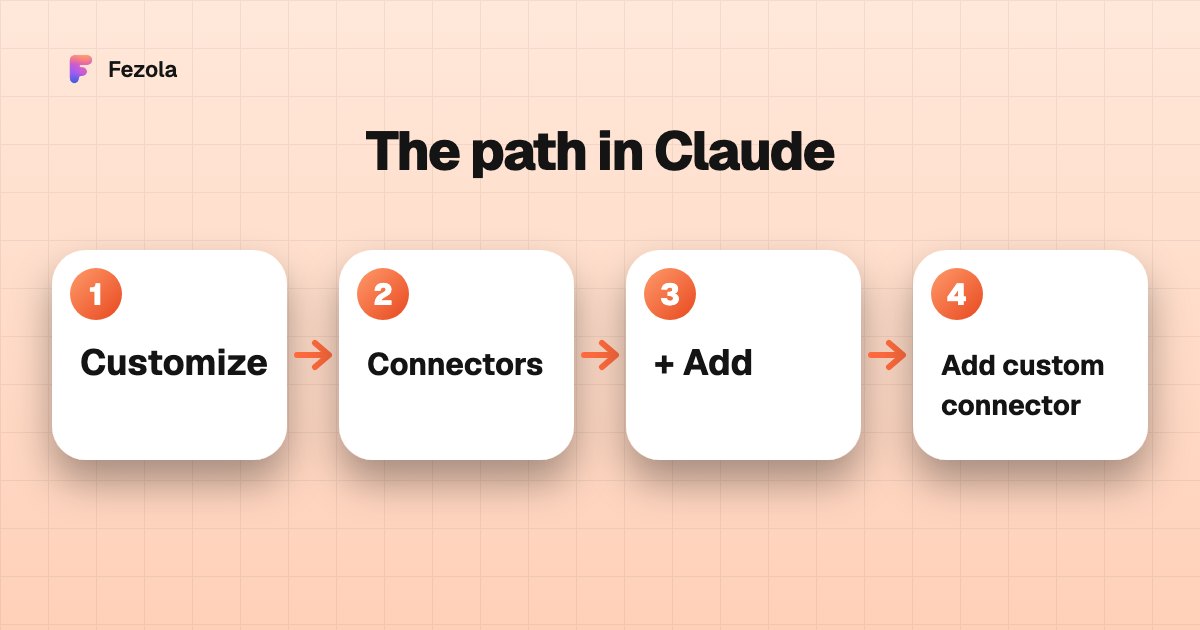 The menu path in Claude, as described by Anthropic (illustration, not a screenshot).
- Go to Customize, Connectors.
- Click + Add, then Add custom connector.
- Enter a name, then the remote MCP server URL, and click Continue.
- Review the authentication settings Claude detected and change them if needed, then click Continue.
- Choose an authentication option: Sign in now, Sign in when needed or No sign in.
- Choose an OAuth client option: Use Claude's published identity (Recommended), Register automatically or Use your own OAuth client. It does not appear if you chose No sign in.
- If the server does not use OAuth, add fixed credentials (an API key or bearer token) under Request headers. They are stored encrypted.
- Click Add.
Team and Enterprise
On Team plans, Owners and Primary Owners add connectors. On Enterprise, owners, primary owners and people with a custom role that includes Manage access to Libraries can. They go to Organization settings, Connectors, click Add, hover over Custom, select Web and follow the same steps. Members then go to Customize, Connectors, find the connector (usually labeled Custom) and click Connect.
Use it in a conversation
Click + at the lower left of the chat, then Connectors, and use the toggles to switch it on for that conversation. Anthropic recommends disabling tools you do not need in the Search and tools menu.
Remove or edit one
Go to Customize, Connectors, then click Remove or the three dots next to the connector and follow the prompts. There is no edit: to change a connector, remove it and add it again with the new details.
Worked example: all your mailboxes in one connector
Fezola is a hosted MCP server for Gmail, iCloud, any IMAP mailbox, Google Chat and Telegram. After adding your mailboxes on the Fezola website, add a custom connector named Fezola with the URL https://api.fezola.com/mcp and sign in with OAuth. You land on Fezola's consent screen, which lists the sources Claude will access.
On the Free plan, Anthropic's help page says free users are limited to one custom connector (checked 15 November 2026). A single connector that brings many services behind one URL, like Fezola, therefore fits that limit well: Fezola is free for 2 sources.
The Free plan's single custom connector is enough here, because Fezola holds all your mailboxes behind one URL. If the sign-in fails with the default OAuth client option, try Register automatically: we support dynamic client registration, but have not tested each option, so tell us what works for you. For the rest of the setup see all your inboxes in Claude.
What if I switch Claude account?
Connectors belong to the Claude account that added them, so a second account, or a personal account moved into a Team or Enterprise organization, does not bring them along (checked in Anthropic's help center on 11 November 2026). If your mail goes through Fezola, switching account means adding one connector again instead of one per mailbox. The full explanation is in one connector, every Claude account.
Safety
- Anthropic does not verify custom connectors. Connect only to servers you trust.
- Review permissions at sign-in and limit scopes where possible.
- Watch for prompt injection in tool inputs and outputs: an email can contain instructions aimed at the model.
- Choose "Allow always" only for trusted servers and tools.
- Research can call connector tools without asking for approval, so disable write-capable tools before using it.
An email connector that drafts by default is a safer choice: Fezola saves drafts, and direct sending is off unless you switch it on for a mailbox. For the broader picture, read is it safe to connect your email to an AI?.
Troubleshooting
- The server will not connect. It must be reachable from Anthropic's IP ranges: a server on a private network, behind a VPN or blocked by a firewall will fail. Anthropic publishes its IP addresses for allowlisting.
- Another name shows up. If a connector's domain matches a directory listing, Claude may show that service's name and branding instead of Custom.
- Changes do not apply. Remove the connector and add it again.
On ChatGPT, the steps are different: see how to add an MCP server to ChatGPT. To compare options, see best email MCP servers.
New to MCP? Start with what is MCP, the Model Context Protocol.
Want your assistants to remember across tools? See Claude memory vs ChatGPT memory.
Questions and answers
How do I add a custom connector to Claude?
On Pro and Max, go to Customize, then Connectors, click + Add, then Add custom connector. Enter a name and the remote MCP server URL, review the authentication settings, then click Add.
Can I add a custom connector on the Free plan?
Yes. According to Anthropic's support article, custom connectors using remote MCP are available on Free, Pro, Max, Ultra, Team and Enterprise plans, and Free users are limited to one custom connector.
Do I need to install anything?
No for a remote server: Claude connects from Anthropic's cloud. The server must therefore be reachable over the public internet. Servers on a private network or behind a VPN will not connect.
How do I remove or edit a custom connector?
Go to Customize, then Connectors, and use Remove or the three dots next to the connector. To edit one, Anthropic says you must remove it and add it again with the new details.
Are custom connectors safe?
Anthropic does not verify custom connectors and advises connecting only to servers you trust. Review the permissions at sign-in, watch for prompt injection, and disable write-capable tools before using Research.
Can I use Fezola as a custom connector in Claude?
Yes: name it Fezola and paste https://api.fezola.com/mcp, then sign in with OAuth. The free Claude plan allows one custom connector, which is enough because Fezola holds all your mailboxes behind one URL.
More in MCP basics
Which Claude and ChatGPT plan do you need for custom connectors and MCP servers?
Claude allows custom connectors on Free (one), Pro, Max, Ultra, Team and Enterprise. ChatGPT on Business, Enterprise and Edu, Pro read-only. Checked Nov 2026.
2 min read
Claude connectors: what they are, how to add one, which plans, the best ones
Claude connectors link Claude to outside tools: built-in ones such as Gmail, and custom ones for any remote MCP server, added from Customize, Connectors.
2 min read
Claude Cowork connectors: how to add them and what works in Cowork
Custom connectors work in Claude Cowork on every plan that allows them. Add one from Customize, Connectors, then switch it on per conversation. Nov 2026.
2 min read